

Uncategorized
More beautiful surfaces, more precision and more efficient packing with PreForm from Formlabs

Feb
With the latest version of the PreForm software, Formlabs is introducing new functions for SLA 3D printing (stereolithography) with the Form series and for SLS 3D printing (selective laser sintering) with the Fuse series. The aim of the update is to simplify print preparation, speed up processes and further improve the quality of printed components.
The new version offers numerous tools to make 3D printing workflows more efficient and generally increase user-friendliness. The most important new features include:
- Supports V2 – a completely new support algorithm for SLA
- Advanced tools for support structures
- Integrated measuring functions
- Improved import of CAD assemblies
- New automatic packing function for the build volume
- Optimized navigation and user guidance
This update will help you as a user to reduce the time spent on print preparation and minimize sources of error. This allows you to focus more on design, innovation and problem solving – instead of manual processes.
To use the new functions, download the latest version of PreForm or carry out an update.
Download PreForm Overview of Formlabs products Get in touch with usSupports V2: Quality, precision and convenience in SLA 3D printing
Support structures are a central component of SLA 3D printing, but often pose challenges such as visible support marks, long post-processing times or compromises in terms of speed and surface quality. With Supports V2, Formlabs has therefore developed a new algorithm that addresses precisely these weak points.
Improved surface quality
The new contact points are on average around 50 percent smaller than was the case with previous support systems. At the same time, the algorithm specifically avoids placing support points on large, visible surfaces. Instead, they are preferably placed on edges and corners.
The result is smoother surfaces, sharper details and less reworking. Users benefit from perfectly fitting components directly after printing, especially for functional assemblies.
Greater dimensional accuracy
Supports V2 automatically analyses each model and detects critical geometries that need to be stabilized. Optimized placement of the support points produces more precise printing results.
Internal tests with sophisticated customer models show a significant improvement in dimensional accuracy (measured using reference geometries with a reduction in the average deviation from around 2 millimetres to around 1 millimetre). Even complex or distortion-prone parts remain closer to the original CAD design.
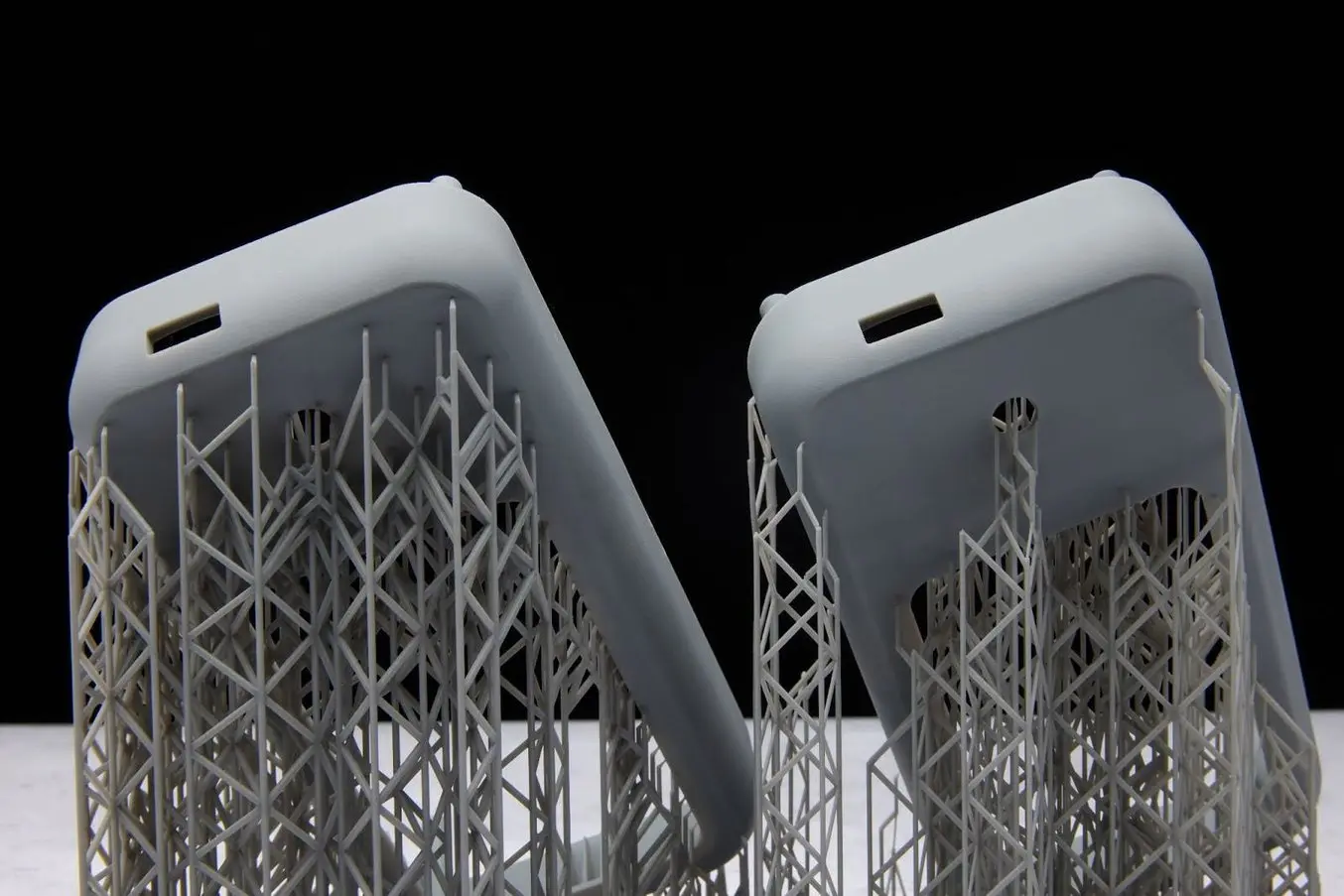
Supports V1 tended to place support contact points on flat surfaces where small support marks were easily noticeable (left). Supports V2 places contact points in areas where curved surfaces conceal the support marks (right).
Easy removal of the support structures
Post-processing has also been optimized. A new, breakable grid structure enables the supports to be removed quickly and in a controlled manner after printing. In combination with smaller contact points, this reduces the risk of damage to sensitive components. Supports V2 therefore delivers the best SLA part quality from Formlabs to date – smoother, more accurate and ready for use more quickly.
The function is already standard for the Formlabs materials Tough 1000 Resin and Tough 2000 Resin V2 and is available as a preset for Grey, Clear, Black and White Resin. Further materials will follow.
New tools simplify print preparation
PreForm offers new tools that make the entire workflow in professional 3D printing more intuitive. From measuring directly in the software to importing complete assemblies: Users benefit from more control and efficiency.
Measuring tools directly in PreForm
The new measuring function can be used to determine distances between any points on a model within a print job. This allows critical features, gap dimensions or component sizes to be checked quickly.
The measured values are clearly displayed in the X, Y and Z directions and can be copied directly. By holding down the shift key, the tool automatically snaps to model edges. This function reduces media breaks, saves time and increases reliability during the final print check.
Optimized import of CAD assemblies
In practice, individual components are rarely designed – the focus is usually on complete assemblies. PreForm now automatically recognizes assemblies from CAD systems and offers the option of importing them as a whole or as individual parts. This saves time and creates flexibility when aligning and packing. Users can also adjust the tessellation during import, ensuring that the geometry is transferred in detail.
Automatic filling of the print job for greater efficiency
Maximize the throughput of your SLA and SLS printers with the new packing function. Models no longer need to be duplicated and arranged manually.
Define parameters such as spacing, rotation or overlapping of rafts (for SLA), and PreForm automatically calculates the optimum packing. This achieves the maximum number of components per print job.
In addition to higher output, companies also benefit economically. With the Fuse series in particular, a higher packing density ensures better powder utilization and lower costs per part. At the same time, automation reduces errors and increases process reliability.
Improved user guidance and navigation
New functions such as section views in all axes, optimized navigation tools and flexible color coding improve the overview and control of complex print jobs.
The section views allow you to quickly check internal structures, support systems and packed building volumes. With the view cube, you can easily switch between standard views and maintain an overview at all times. Thanks to color coding, individual models or complete model lists can be visually structured. This makes it easier to organize and identify components, especially for large projects or teamwork.
Efficient print setup with PreForm
PreForm helps users to create successful print jobs, regardless of their level of experience. The latest updates make even complex and extensive projects easier to implement.
Many of the new functions are based directly on feedback from the user community. You can also contribute your ideas and suggestions by using the “Feedback” function in PreForm. Update PreForm via “Help → Check for updates” or download the latest version.
If you would like to find out more about Formlabs 3D printing solutions, please contact us. As a certified partner, we will be happy to advise you and help you find the right workflow for your company.
Download PreForm Overview of Formlabs products Get in touch with us
